Keep clients and properties connected
Reuse saved contact and property information when opening another case. A later address or contact update does not rewrite an earlier case’s snapshot.
Collect repair photos and invoices, send automatic client reminders and prepare a professional carrier response packet. Keep every requirement and its evidence together.
US$29/month for your agency. Five staff included.
No credit card required. No automatic charge.
Use Coverstride alongside your existing AMS. It does not currently synchronize with that system. Your agency reviews the evidence and sends packets through the carrier’s usual channel.
Keep the agency’s work queue and the client’s checklist connected.
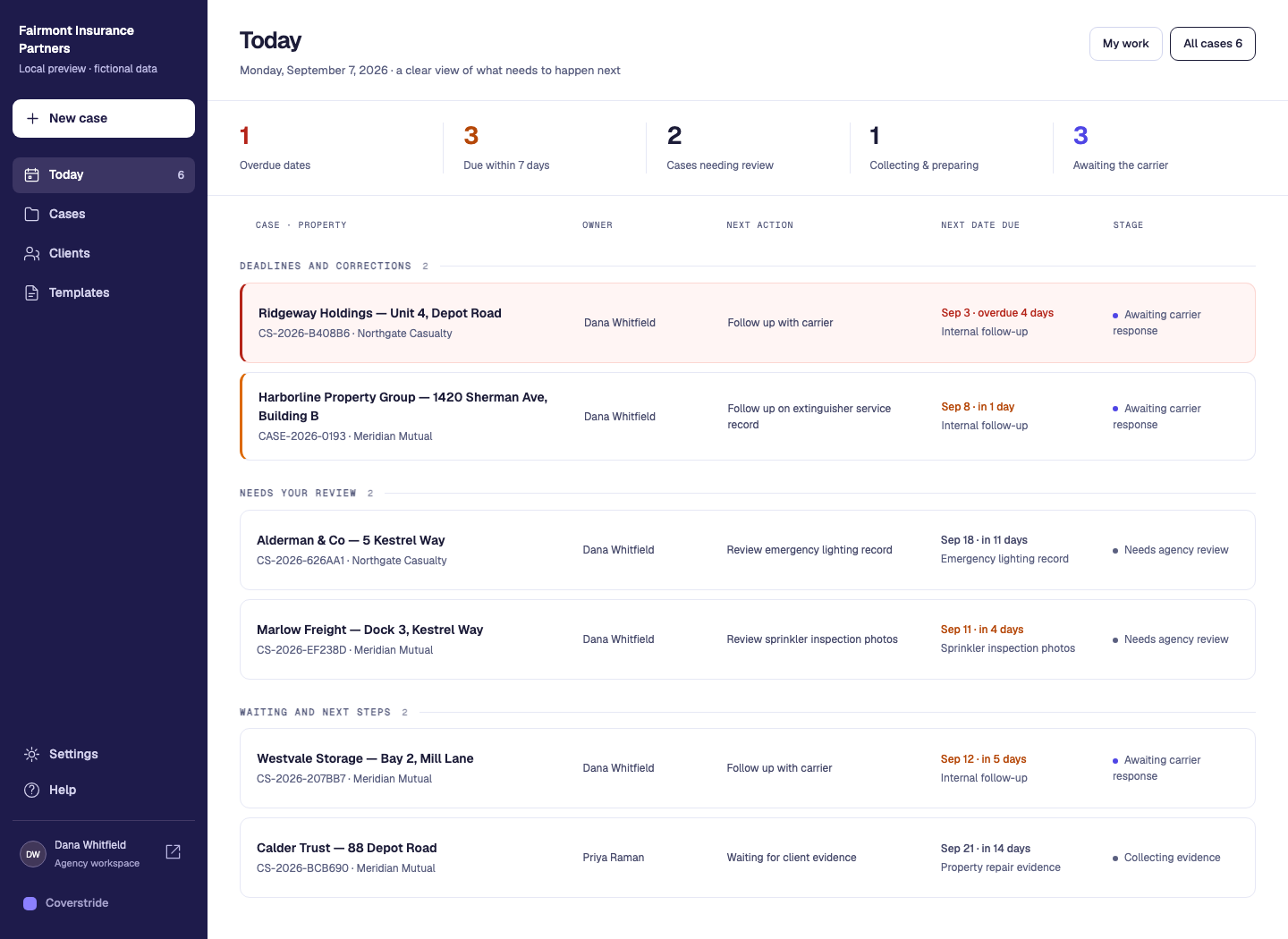
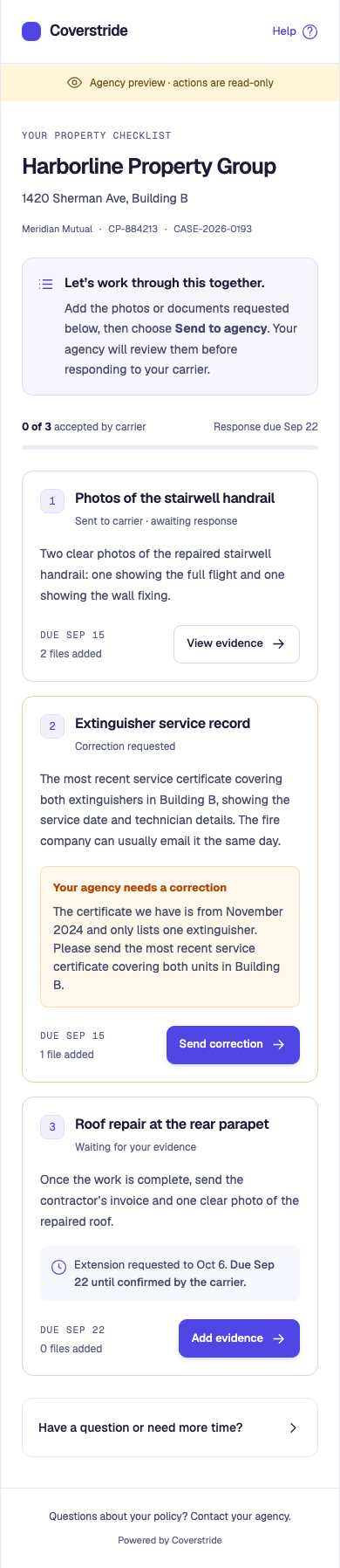
A client’s latest reply may include a photo but omit the invoice. Another requirement may already be with the carrier. When those details are scattered across inboxes and folders, a single “in progress” label tells your team very little. Track each requirement and the case’s next action together.
Take one carrier notice from requested corrections to a recorded response. Use this checklist with your current tools, or follow the same steps in Coverstride.
Read the guide below, copy the blank template or download an editable text file. Replace the placeholders and review it before sharing.
Save the notice, property and policy reference, notice date and carrier response deadline. Name the staff member responsible for the next action. Keep a client target date separate from the carrier deadline.
Give each correction a reference such as R1. Record the carrier wording, then write a clear client instruction. Check the instruction against the notice before sending it.
List each requested document or photo separately, including quantity and what it should show. Use the actual notice and agency instructions; an invoice and two photos below are an example, not a universal requirement.
Use an approved client channel. Record when you shared the checklist and the next follow-up date. Keep questions and requested extensions visible; a client request does not change the carrier deadline.
Check the property, relevant correction, readability and requested file count. Record missing evidence and specific corrections. Receiving a file is different from reviewing it.
List the evidence you reviewed, identify outstanding items and send through the carrier’s accepted channel. Record the delivery reference and carrier reply. Only record an extension or acceptance when confirmed.
Fictional example: Alderstone Property Group, 84 Sample Road. Carrier response due November 20; agency requests client evidence by November 13. R1 asks for evidence of a repaired entrance handrail.
| Evidence item | Current state | Next action |
|---|---|---|
| Contractor invoice · 1 document | Still needed | Client sends the invoice for this property. |
| Completed repair · 2 photos | Sent for review | Agency checks one overview and one detail photo. |
| Carrier response | Not yet sent | Agency prepares the response after review. |
Copy and edit this text. The download contains the same blank template; neither option requires signup.
INSPECTION FOLLOW-UP CHECKLIST
Agency / case reference: [ ]
Client and property: [ ]
Policy / carrier reference: [ ]
Notice date: [ ]
Carrier response deadline: [ ]
Client evidence target date: [ ]
Agency owner / next follow-up date: [ ]

For each correction:
[ ] Requirement reference and carrier wording: [ ]
[ ] Client instruction checked against the notice: [ ]
[ ] Evidence item, quantity and instructions: [ ]
[ ] Request shared through / on: [ ]
[ ] Missing evidence or question / next action: [ ]
[ ] Agency review decision and date: [ ]
[ ] Response files and outstanding items: [ ]
[ ] Sent through / on / delivery reference: [ ]
[ ] Carrier reply and confirmed next step: [ ]

Requested extension: [ ]
Carrier-confirmed extension and confirmation reference: [ ]
Keep the original deadline until the carrier confirms a change.
Use the actual notice and agency-approved instructions.
Keep requested and confirmed dates separate with the inspection deadline follow-up kit.
The agency stays in control of the instructions, review and carrier response.
Choose the saved client and property, record the policy and deadline, and write a requirement for each requested correction. The agency checks the wording against the actual notice before publishing the case.
Share the case-specific checklist link. Clients send evidence against the relevant requirement; agency staff review those files and can ask for a specific correction.
Prepare a packet, deliver it through the carrier’s usual channel and record the delivery. Keep the case open while awaiting a decision, then record the actual outcome.
Use these tools in your agency workspace. The examples on this page use fictional cases.
Reuse saved contact and property information when opening another case. A later address or contact update does not rewrite an earlier case’s snapshot.
Global search helps staff reach relevant cases, requirements and evidence. The agency queue brings due work and incoming updates back into the day’s workflow.
Coverstride is built for this follow-up process. It does not currently synchronize with an agency management system or replace policy administration, accounting or carrier portals.
Understand where Coverstride fits before you change how your team works.
Yes. A saved client can have multiple properties and cases. Each follow-up case retains its own property, policy, requirements, deadline and response history.
The current workflow has the agency enter and review the requirements. It does not promise automatic interpretation of a carrier notice.
No. Closing a case is an agency workflow action after recording the outcome. Coverage decisions and acceptance of repairs remain with the carrier.
See the details that matter at each step, with practical examples from Coverstride’s workflow.
Create a clear request for insurance inspection repair photos and documents. Use the free builder and template, then organize follow-up in Coverstride.
Explore this workflowDaily follow-upUse a free inspection deadline tracker, extension-request template and response log. Keep client targets, carrier deadlines and confirmed extensions clear.
Explore this workflowCarrier responsesPrepare a professional carrier response packet with a case summary, reviewed evidence previews, an attachment index and consistently named original files.
Explore this workflowStart a 30-day free trial with no credit card. Have a question first? We’re here to help.